Wednesday 23 May

How are you using the digital technology intentionally to feel creative and to be able to learn... To engage with the curriculum and making the best use of technology.
create : allowing our young people to be creative beings that was not part of the traditional learning in the classroom….to give the learners the opportunity to share their learning by using digital technology.
The 6 C’s of education:
Character
Citizenship
Communication
Creativity
Collaboration
Critical thinking
From this: creativity provides the avenue for EXPRESSION
You need to be able to learn, unlearn and relearn...learning is now fluid and changing
Sight, sound and motion...keywords for creativity and sharing learning
Rewindable resource…
Kent:
It is more important the we as teachers need to be creative, more creative than our students...so they don’t want to exit out of your “boring” website….be creative!!
Watch the slides: YOUTUBE fundamentals: essential reading for all teachers
Adults can self regulate, kids usually have trouble with this
https://drive.google.com/file/d/1foNE_Dwi_-aqfShKe51fUMqR9vT75mkX/view
https://drive.google.com/file/d/1J7WoAfw5qvdmGycFQ2ibHB16WWEg3VmB/view
Create a playlist:
Try and create a playlist
https://drive.google.com/file/d/1cpYyVRuQpA4oiQYocijL48lyWiBu9a1n/view
How to : Live stream (add your own content...and to create content)
3 ways:
https://docs.google.com/presentation/d/1wr_mpHZg_gPCm5ejA7C5x4ynbtW_N396T20PvyVv1nQ/edit?usp=sharing
1. Using a full HD camera (camcorder) CANON Legria HF G40: film the school news of the day
Teradek: VidiU Pro (attach to any camera, and life streaming on the spot...camera has got a SD card as well) ($1200) and can go to multiple platforms (facebook, Youtube, etc...simultaneously)
YouTube live (students create something not only because the teacher says so, but NOW because they will have a live audience...example writing a blog of a book that student read, and the author responded...wow) (live locally, participate globally) (you should be successful by staying locally, but sharing globally)
(Unlisted mean you can’t find it, unless you have the link; public it can be found by anyone)
Watch the slides: YOUTUBE fundamentals: essential reading for all teachers
Adults can self regulate, kids usually have trouble with this
https://drive.google.com/file/d/1foNE_Dwi_-aqfShKe51fUMqR9vT75mkX/view
https://drive.google.com/file/d/1J7WoAfw5qvdmGycFQ2ibHB16WWEg3VmB/view
Create a playlist:
Try and create a playlist
https://drive.google.com/file/d/1cpYyVRuQpA4oiQYocijL48lyWiBu9a1n/view
How to : Live stream (add your own content...and to create content)
3 ways:
https://docs.google.com/presentation/d/1wr_mpHZg_gPCm5ejA7C5x4ynbtW_N396T20PvyVv1nQ/edit?usp=sharing
1. Using a full HD camera (camcorder) CANON Legria HF G40: film the school news of the day
Teradek: VidiU Pro (attach to any camera, and life streaming on the spot...camera has got a SD card as well) ($1200) and can go to multiple platforms (facebook, Youtube, etc...simultaneously)
YouTube live (students create something not only because the teacher says so, but NOW because they will have a live audience...example writing a blog of a book that student read, and the author responded...wow) (live locally, participate globally) (you should be successful by staying locally, but sharing globally)
(Unlisted mean you can’t find it, unless you have the link; public it can be found by anyone)
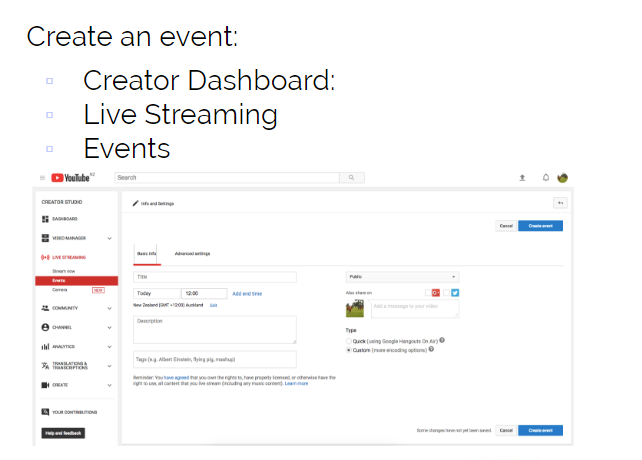
2. Using a laptop Webcam:
- Using YouTube

3. Using a drone
Drone ( cross country, rugby training etc)
DJI Spark drone
($800...through warehouse was $300)
Can be programmed via the student’s chromebooks...angles, direction, create amazing maths learning rotations all through coding
Process of YouTube: Consume ... create ... share (live streaming)
Kerry:
Exploring slides and drawing
https://docs.google.com/presentation/d/1t_KVo7n3APmr5hug5rIHn_55ooOMEKVSl9A75FAP8Uo/edit?usp=sharing
Mindmaps: https://docs.google.com/drawings/d/1yWGnqPPpse24xfQSrWiwErubYIFtbLZg6oFE5nNflXM/edit
Vocab list: https://docs.google.com/drawings/d/1lmJE1WcoXWNNV4HtpO71eJIm4G1pxeE5Qmi9c6tWpZk/edit
How to make a google drawing:
https://drive.google.com/file/d/1_AP5wTy9GsRaPxLtTokntfE-04MK3MS_/view
Kent:
SISOMO
sisomo: sight, sound, and motion.
Keep it simple; make your own template
https://www.slideshare.net/jcolman/wicked-ambiguity-solving-the-hardest-communication-problems/1?src=clipshare
Embrace blank slides; talk about it, don’t read off it
Make your own formats; your own design
Tips and tricks:
Comments will only be seen by teacher
For instructions put a comment in text box
How to embed the google slide that I've created to my blog:
https://drive.google.com/file/d/1B5TaTVr8ap2zWVqNg5YCOo4q61eVBb3G/view
How to embed the google slide that I've created to my blog:
https://drive.google.com/file/d/1B5TaTVr8ap2zWVqNg5YCOo4q61eVBb3G/view


